


If you have scrolled through Instagram lately, you have probably noticed something interesting. Many photos look like they were taken decades ago, with soft colors, light leaks, and that unmistakable film grain. This vintage look is not coming from old cameras or expensive equipment. Instead, it is coming from a simple smartphone app that has changed how people approach their Instagram content.
The Huji app Instagram trend has taken over feeds everywhere, and for good reason. This camera app recreates the look of disposable film cameras from the 1990s, giving digital photos a nostalgic quality that stands out in a sea of perfectly polished images. Whether you are a casual user looking to add some personality to your posts or a content creator building a distinctive visual brand, understanding how to use Huji can transform your Instagram presence.
In this guide, we will explore everything you need to know about using the Huji app for Instagram. From understanding its unique features to building a cohesive aesthetic across your feed, you will learn practical tips for making the most of this popular photo tool.
What Is the Huji App?

The Huji app is a camera application designed to make your smartphone photos look like they were taken with a disposable film camera. The name comes from the Korean word for film, and the app delivers exactly what that name promises. When you take a photo with Huji, the app automatically applies effects that mimic the characteristics of analog photography.
What makes Huji different from other filter apps is its approach to authenticity. Rather than letting you choose from dozens of preset filters, Huji applies its effects automatically and somewhat randomly. This means each photo comes out slightly different, just like real film photography where you never knew exactly how your pictures would turn out until you developed them.
The app became popular because it offered something that felt genuine in a world of heavily edited photos. People were tired of images that looked too perfect, and Huji provided a way to create content that felt more personal and less manufactured. The imperfections became the appeal.
Using Huji is straightforward. You open the app, point your phone at your subject, and take a photo. The app handles everything else, adding light leaks, adjusting colors, and applying grain to create that vintage look. You can then save the photo to your camera roll and share it wherever you like, including Instagram.
Why Retro Photography Is Trending on Instagram

The appeal of retro photography on Instagram goes beyond simple nostalgia. There is something about vintage-style images that captures attention and creates emotional connections with viewers. In a platform filled with crisp, high-definition photos, images with film grain and warm tones stand out immediately.
Part of this trend connects to the broader interest in film photography that has grown over recent years. Many people who never used actual film cameras are drawn to the aesthetic because it feels more artistic and intentional. The slight imperfections in film-style photos make them feel more human and relatable.
Instagram users have discovered that vintage aesthetics help their content feel more authentic. When everything looks too polished, it can create distance between creators and their audiences. Photos with a retro feel often seem more approachable and genuine, which encourages engagement and connection.
Another reason for this trend is the desire to stand out. When most photos on Instagram look similar, having a distinctive visual style helps your content get noticed. The Huji app Instagram aesthetic gives users an easy way to differentiate their posts without needing advanced editing skills. You might also explore a black and white Instagram aesthetic as another way to create a unique visual identity for your feed.
The emotional quality of vintage photos also plays a role. Warm colors and soft light leaks create a dreamy, romantic atmosphere that many people find appealing. These photos often evoke feelings of warmth and comfort, making them perfect for personal content and lifestyle posts.
Key Features That Make Huji Stand Out
Understanding the specific features of Huji helps you use the app more effectively. Each element contributes to the overall vintage aesthetic that makes Huji photos so distinctive.
Light Leaks and Color Effects
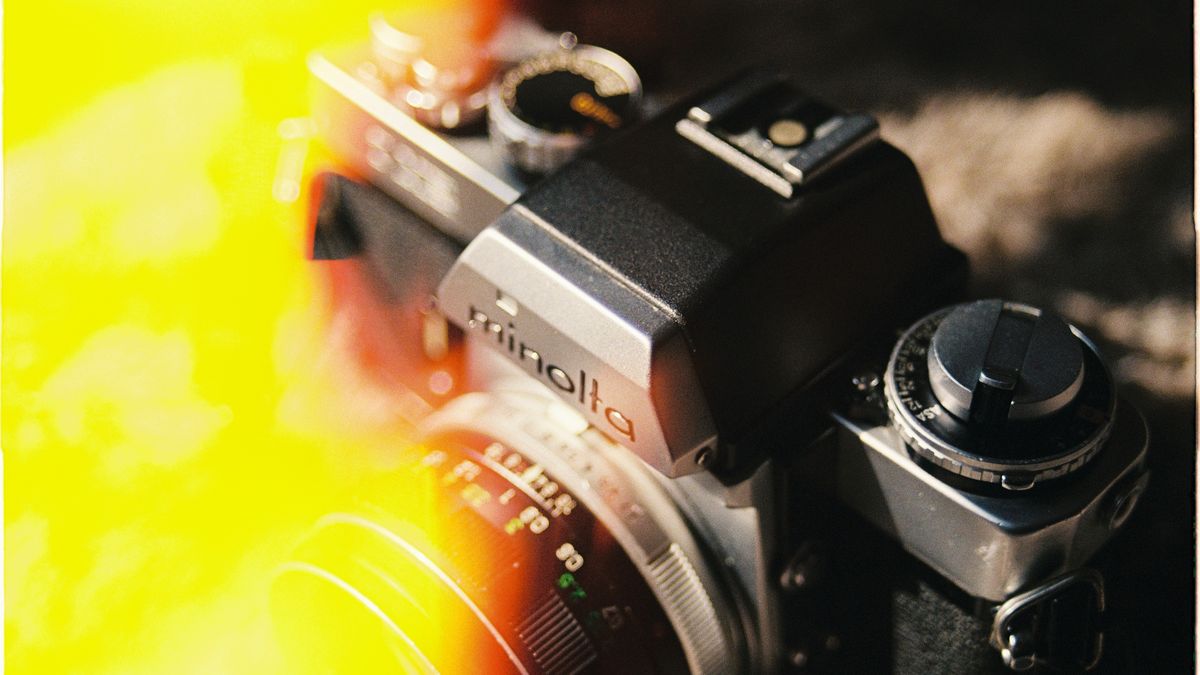
One of the most recognizable features of Huji photos is the light leak effect. These are the bright, colorful streaks that appear along the edges of images, mimicking what happens when light accidentally enters a film camera. Huji applies these effects randomly, so some photos have dramatic light leaks while others are more subtle.
The color grading in Huji tends toward warm tones, with slightly faded highlights and rich shadows. This creates a look that feels like photos from the late 1990s or early 2000s. The colors are not quite accurate to real life, but that is part of the charm.
Date Stamps
Huji includes an optional date stamp feature that adds a small orange date in the corner of your photos. This mimics the automatic date stamps that disposable cameras used to print on every image. You can choose to include this feature or turn it off depending on your preference.
Many users love the date stamp because it adds to the authentic vintage feel. Others prefer to leave it off for a cleaner look. The choice depends on your personal aesthetic and how you plan to use the photos.
Film Grain and Texture
Real film photographs have a natural grain that comes from the chemical process of developing film. Huji recreates this texture digitally, adding subtle noise to your images that makes them feel more organic. This grain is especially noticeable in areas of solid color or in shadows.
The texture helps photos feel less digital and more tactile. It adds depth and character that smooth, perfectly sharp digital images often lack. When you crop images for Instagram, the grain effect remains consistent, maintaining the vintage look across different compositions.
Random Processing
Perhaps the most interesting feature of Huji is its unpredictability. The app does not apply the same effects to every photo. Instead, it varies the intensity of light leaks, the warmth of colors, and the placement of effects. This randomness means you might take several photos of the same subject and get noticeably different results.
This unpredictability mirrors the experience of using actual film, where you never knew exactly what you would get until the photos were developed. It encourages users to take multiple shots and embrace the element of surprise.
How to Use Huji for Your Instagram Feed

Getting great results from the Huji app Instagram combination requires some thought about how you shoot and select your photos. Here are practical steps for incorporating Huji into your content strategy.
Shooting Tips for Better Huji Photos
Lighting matters significantly when using Huji. The app works best in natural light, particularly during golden hour when the sun is low in the sky. The warm tones of natural light complement the vintage effects beautifully. Harsh midday sun can create too much contrast, while very low light may result in grainy, unclear images.
Consider your subjects carefully. Huji excels at capturing everyday moments, casual portraits, and lifestyle content. The vintage aesthetic suits relaxed, candid shots better than formal or highly staged images. Think about what would look natural in an old photo album.
Take multiple shots of each scene. Because Huji applies effects randomly, you might get one photo with perfect light leaks and another that feels too plain. Having options lets you choose the best result for your feed.
Selecting Photos for Your Feed
Not every Huji photo will be perfect for Instagram. When selecting images, look for photos where the effects enhance rather than distract from your subject. The best Huji photos have a balance between the vintage effects and clear, interesting content.
Think about how each photo will fit with your existing posts. If you are building a cohesive feed, you want your Huji photos to complement your other content rather than clash with it. Learning how to create the perfect Instagram post involves understanding how individual images work together as part of a larger visual story.
Building a Content Plan
Rather than posting every Huji photo immediately, consider building a collection of images you can draw from over time. This approach helps you maintain consistency and gives you flexibility in your posting schedule.
You can also boost your Instagram aesthetic by mixing Huji photos with other content types. Some users post Huji photos exclusively, while others use them as accent pieces within a more varied feed. Both approaches can work well depending on your goals.
Huji vs Other Photo Editing Apps

While Huji has carved out a unique space in the photo app market, it is worth understanding how it compares to other popular options. Each app serves different needs, and knowing the differences helps you choose the right tool for each situation.
Huji Compared to VSCO
VSCO is another popular choice for users who want film-inspired looks. However, the two apps take very different approaches. VSCO offers extensive control over your edits, with dozens of filters and adjustment tools that let you fine-tune every aspect of your image.
Huji, by contrast, gives you almost no control. You take the photo, and the app decides how it will look. This simplicity is either a benefit or a limitation depending on your preferences. If you want creative control, VSCO is the better choice. If you want quick, authentic-feeling results without decision fatigue, Huji wins.
Many users actually use both apps. They might shoot with Huji for certain content and use VSCO when they need more precision or want to edit photos taken with their regular camera app.
Huji Compared to Adobe Lightroom
Adobe Lightroom represents the professional end of mobile photo editing. It offers powerful tools for adjusting exposure, color, and detail with precision that no filter app can match. Professional photographers and serious content creators often rely on Lightroom for their work.
The trade-off is complexity. Lightroom has a learning curve, and getting great results requires understanding photography concepts and spending time on each edit. Huji offers instant results with no learning required.
For the Huji app Instagram aesthetic, Lightroom cannot really compete. While you could theoretically recreate Huji-style effects in Lightroom, it would take significant effort and still might not capture the same spontaneous quality. Huji excels specifically at what it does, while Lightroom excels at everything else.
When to Choose Each App
Choose Huji when you want quick, nostalgic photos with minimal effort. It is perfect for casual content, personal moments, and building a vintage aesthetic without spending time on editing.
Choose VSCO when you want film-inspired looks but need more control over the final result. It works well for users who enjoy the editing process and want consistency across their images.
Choose Lightroom when you need professional-quality edits or want to work with RAW files. It is the best choice for serious photography work and commercial content.
Tips for Creating a Cohesive Huji Aesthetic
Building a consistent visual style on Instagram takes intention and planning. Here are practical tips for maintaining a cohesive Huji aesthetic across your profile.
Stick to Similar Subjects and Settings
Consistency in what you photograph helps create a unified look. If your Huji photos feature a mix of landscapes, food, portraits, and random objects, your feed may feel scattered. Consider focusing on a few subject types that work well with the vintage aesthetic.
Lifestyle content, casual portraits, and everyday moments tend to work best with Huji. These subjects feel natural in a vintage context and help reinforce the nostalgic mood of your feed.
Pay Attention to Color Themes
While Huji applies its effects automatically, you can influence the overall color palette by choosing what you photograph. Warm-toned subjects like sunsets, wooden textures, and earth-toned clothing complement the app’s color grading beautifully.
Avoid subjects with very bright, saturated colors that might clash with the vintage effects. Neon signs, for example, might look jarring in a Huji photo, while a cozy coffee shop scene would feel perfectly at home.
Learn from Successful Creators
Studying influencer Instagram strategies can provide inspiration for building your own aesthetic. Notice how successful creators maintain consistency while still keeping their content interesting. They often have clear visual themes that make their profiles immediately recognizable.
You do not need to copy anyone else’s style, but understanding what works can help you develop your own approach. Pay attention to how often they post Huji-style content, how they mix it with other types of posts, and what subjects they tend to photograph.
Be Selective About What You Post
Not every Huji photo deserves a spot on your feed. Being selective helps maintain quality and consistency. Save your best shots for your main feed and use Stories for more casual, in-the-moment content.
Using Huji Photos in Instagram Stories
Instagram Stories offer a different context for sharing Huji content. The temporary nature of Stories makes them perfect for more casual, spontaneous Huji photos that might not fit your main feed aesthetic.
Why Huji Works Well in Stories
Stories have a more relaxed, authentic vibe than main feed posts. The vintage quality of Huji photos fits this context perfectly. Viewers expect Stories to feel more personal and less polished, which aligns with the Huji aesthetic.
The vertical format of Stories also works well with Huji. You can shoot photos specifically for Stories or crop your existing Huji photos to fit the format. Either approach can produce engaging content.
Engagement and Reach
Huji photos in Stories often perform well because they stand out from typical smartphone photos. The distinctive look catches attention as viewers tap through their Stories feed. When people view Instagram Stories, unique visual content tends to hold their attention longer.
Consider using Huji photos as backgrounds for text-based Stories or polls. The vintage texture adds visual interest to otherwise plain content and makes your Stories feel more cohesive with your overall brand.
Story Highlights
If you create Stories with Huji photos that you want to keep, save them to your Highlights. This lets you showcase your best vintage content permanently on your profile. You can create themed Highlights that feature your Huji aesthetic, giving visitors a clear sense of your visual style.
Managing and Saving Your Huji Photos
As you build a collection of Huji photos, organization becomes important. Good management practices ensure you can find and use your best content when you need it.
Organizing Your Camera Roll
Create a dedicated album on your phone for Huji photos. This makes it easy to find your vintage content when planning posts. You can further organize by creating sub-albums for different themes or time periods.
Regularly review your Huji photos and delete ones that did not turn out well. This keeps your collection manageable and ensures you are only working with your best content.
Backing Up Your Content
Do not rely solely on your phone to store your Huji photos. Use cloud storage services to back up your images so you do not lose them if something happens to your device. This is especially important if you have built a significant collection of content.
You might also want to save Instagram photos that you have already posted. This creates a backup of your published content and lets you repurpose images for other platforms or future use.
Repurposing Content
Your Huji photos can work across multiple platforms, not just Instagram. Consider using them on other social media accounts, in blog posts, or for personal projects. Having organized files makes repurposing much easier.
If you need to download content from Instagram for any reason, Instagram photo downloader tools can help you retrieve your posted images. This is useful if you have lost the original files or want to create collections of your published work.
The Huji app Instagram combination has genuinely changed how many people approach their social media content. By embracing the imperfect, nostalgic quality of vintage photography, users can create feeds that feel more personal and authentic. Whether you use Huji for every post or just occasionally, understanding how to work with this app opens up creative possibilities that can help your content stand out in a crowded digital space.
