


Growing your Instagram presence takes time and effort. Between creating content, responding to messages, and keeping up with comments, it can feel like a full-time job. That’s where Instagram automation strategies come in handy. These tools and techniques help you stay active on the platform without being glued to your phone all day.
The good news is that automation doesn’t mean losing your personal touch. When done right, it actually frees up time so you can focus on what matters most—building real connections with your followers. In this guide, you’ll discover ten practical ways to automate your Instagram workflow while keeping your audience engaged and growing.
Whether you’re a small business owner, content creator, or social media manager, these strategies will help you work smarter, not harder. Let’s dive into the specific tactics that can transform how you manage your Instagram account.
Why Instagram Automation Matters for Engagement
Consistency is one of the biggest factors in Instagram success. Your followers expect regular content, timely responses, and ongoing interaction. But maintaining that level of activity manually is exhausting and often unsustainable.
Automation helps solve this problem by handling repetitive tasks in the background. Instead of remembering to post every day at the perfect time, you can schedule content in advance. Rather than typing the same welcome message to every new follower, automated responses can do it for you.
The real benefit goes beyond saving time. When you automate routine tasks, you can focus your energy on creating better content and having meaningful conversations with your community. This balance is essential if you want to build a loyal Instagram audience that actually cares about what you share.
Timing also plays a crucial role in engagement. Research on market conditions shows how external factors influence behavior patterns, and the same principle applies to social media. Your audience is more active at certain times, and automation ensures you reach them during those peak moments—even when you’re busy with other things.
Schedule Posts for Optimal Timing
One of the simplest and most effective Instagram automation strategies is scheduling your posts ahead of time. Instead of scrambling to create content on the spot, you can plan your feed days or even weeks in advance.
Scheduling tools let you choose exactly when your posts go live. This means you can publish content when your audience is most active, even if that happens to be 6 AM or during your lunch break. You don’t have to interrupt your day to hit the post button.
The key to making scheduling work is understanding your audience’s habits. Check your Instagram Insights to see when your followers are online. Most accounts find that certain days and times consistently perform better than others. Once you identify these patterns, you can build your posting schedule around them.
Maintaining consistent Instagram posting becomes much easier when you batch your scheduling sessions. Set aside time once a week to plan and schedule your content. This approach keeps your feed active without requiring daily attention.
Many scheduling tools also let you preview how your grid will look before posts go live. This helps you maintain a cohesive visual style and catch any issues before they appear on your profile.
Automate Direct Message Responses

Direct messages are a powerful way to connect with your audience, but managing them can be overwhelming. Automated DM responses help you acknowledge followers quickly while you handle other tasks.
Welcome messages are a great starting point. When someone follows you or sends their first message, an automated reply can greet them and point them toward helpful resources. This immediate response makes followers feel valued, even when you’re not available to reply personally.
You can also set up automated responses for common questions. If people frequently ask about your business hours, pricing, or how to work with you, quick replies save you from typing the same information repeatedly.
The best automated messages feel personal rather than robotic. Include the person’s name when possible, and keep the tone friendly. You might even ask questions to increase engagement in your welcome messages, encouraging followers to share what brought them to your account.
Remember that automation should start conversations, not replace them. Use automated messages as a bridge until you can respond personally. Your followers will appreciate the quick acknowledgment, and you’ll have more time for meaningful follow-up conversations.
Use Caption Templates and AI Writing Tools
Writing captions is one of the most time-consuming parts of Instagram content creation. Templates and AI tools can speed up this process significantly while maintaining quality.
Caption templates give you a starting framework for different types of posts. You might have one template for educational content, another for behind-the-scenes posts, and a third for promotional content. Each template includes your typical structure, call-to-action style, and hashtag groups.
When you sit down to write, you’re not starting from scratch. You simply fill in the specific details for that post. This approach cuts writing time dramatically and helps maintain consistency across your content.
AI writing tools take this a step further by generating caption ideas based on your input. You provide the topic or key points, and the tool suggests different ways to phrase your message. This can be especially helpful when you’re feeling stuck or need fresh angles on familiar topics.
However, it’s worth understanding the trade-offs. AI-generated Instagram captions can sometimes feel generic if you don’t customize them. The best approach is using AI as a starting point, then adding your unique voice and specific details that only you would know.
Templates and AI tools work best when combined with your own creativity. They handle the heavy lifting of structure and initial drafts, freeing you to focus on the personal touches that make your content stand out.
Set Up Comment Filters and Auto-Replies
Comments are a sign of healthy engagement, but they also require management. Comment automation helps you handle spam, respond to common questions, and keep conversations positive.
Comment filters are your first line of defense against spam and inappropriate content. You can set up filters to automatically hide comments containing certain words or phrases. This keeps your comment sections clean without requiring constant monitoring.
Instagram’s built-in tools let you create custom keyword lists. Add common spam phrases, competitor mentions, or any terms you don’t want appearing on your posts. Filtered comments are hidden from public view but remain accessible if you need to review them.
Auto-replies take comment management a step further. When someone leaves a comment containing specific keywords, you can trigger an automatic response. For example, if someone comments asking about your services, an auto-reply could thank them and direct them to your link in bio for more information.
This strategy works particularly well for frequently asked questions. Instead of typing the same response dozens of times, you set it up once and let automation handle the rest. Just make sure your auto-replies sound natural and helpful rather than promotional or pushy.
The goal is to acknowledge engagement quickly while filtering out noise. This creates a better experience for your genuine followers and saves you hours of manual comment management.
Connect Your Tools with Workflow Automation
Most Instagram creators use multiple tools—scheduling apps, design software, analytics platforms, and more. Workflow automation connects these tools so they work together seamlessly.
Think about your current process. You might create graphics in one app, write captions in another, schedule posts in a third, and track results in a fourth. Each time you move between tools, you’re spending time on manual transfers that could be automated.
Platforms like Zapier let you create connections between different apps. When something happens in one tool, it automatically triggers an action in another. For example, when you add a new image to a specific folder, it could automatically create a draft post in your scheduling tool.
These connections, often called “zaps” or “workflows,” eliminate repetitive steps from your process. You can automatically save Instagram posts to a spreadsheet, send notifications when you receive certain types of messages, or sync your content calendar with your team’s project management tool.
The possibilities expand when you consider how automation fits into your broader strategy. Following proven Instagram marketing tips becomes easier when your tools communicate with each other. You spend less time on administrative tasks and more time on strategy and creativity.
Start by identifying the most repetitive parts of your workflow. Those are the best candidates for automation. Even connecting just two or three tools can save significant time over weeks and months.
Automate Email Collection from Instagram
Instagram is great for building awareness, but email gives you a direct line to your audience that you own. Automating the connection between Instagram and your email list helps you capture leads without manual data entry.
The process typically starts with a lead magnet—something valuable you offer in exchange for an email address. This might be a free guide, checklist, discount code, or exclusive content. You promote this offer on Instagram and direct people to a landing page where they enter their information.
Once someone submits their email, automation takes over. Their information flows directly into your email marketing platform, where they’re added to the appropriate list and receive a welcome sequence. Platforms like Mailchimp make this process straightforward with built-in automation features.
For more advanced needs, HubSpot offers CRM capabilities that track the entire customer journey from Instagram follower to email subscriber to paying customer. This level of tracking helps you understand which Instagram content drives the most valuable leads.
You can also automate email collection through Instagram’s native features. When someone sends a DM with a specific keyword, an automated response can deliver your lead magnet and ask for their email address. This creates a seamless experience that feels personal while running on autopilot.
The key is making the value exchange clear and the process simple. People are more willing to share their email when they understand exactly what they’ll receive and trust that you won’t spam them.
Create Content Batches for Faster Production

Content batching means creating multiple pieces of content in a single session rather than making one post at a time. When combined with automation, this approach dramatically increases your efficiency.
The concept is simple: instead of taking one photo, editing it, writing a caption, and posting it, you dedicate specific time blocks to each task. One day might be for shooting all your photos for the month. Another session focuses entirely on editing. A third is devoted to writing captions.
This method works because it reduces context switching. Your brain doesn’t have to jump between creative tasks and administrative ones. You get into a flow state and produce more content in less time.
The principles behind direct mail automation in other marketing channels apply here too. Just as businesses batch their direct mail campaigns for efficiency, you can batch your Instagram content creation. The automation mindset transfers across different marketing activities.
Once you’ve created a batch of content, scheduling tools let you queue everything up at once. You might spend one afternoon scheduling an entire month of posts. Then you’re free to focus on engagement and community building without worrying about what to post next.
Creating Instagram posts that convert requires thought and creativity. Batching gives you the mental space to focus on quality rather than rushing to meet daily posting deadlines.
Start small if batching feels overwhelming. Try creating a week’s worth of content in one session. As you get comfortable with the process, you can extend to two weeks or a full month.
Track Performance with Automated Reports
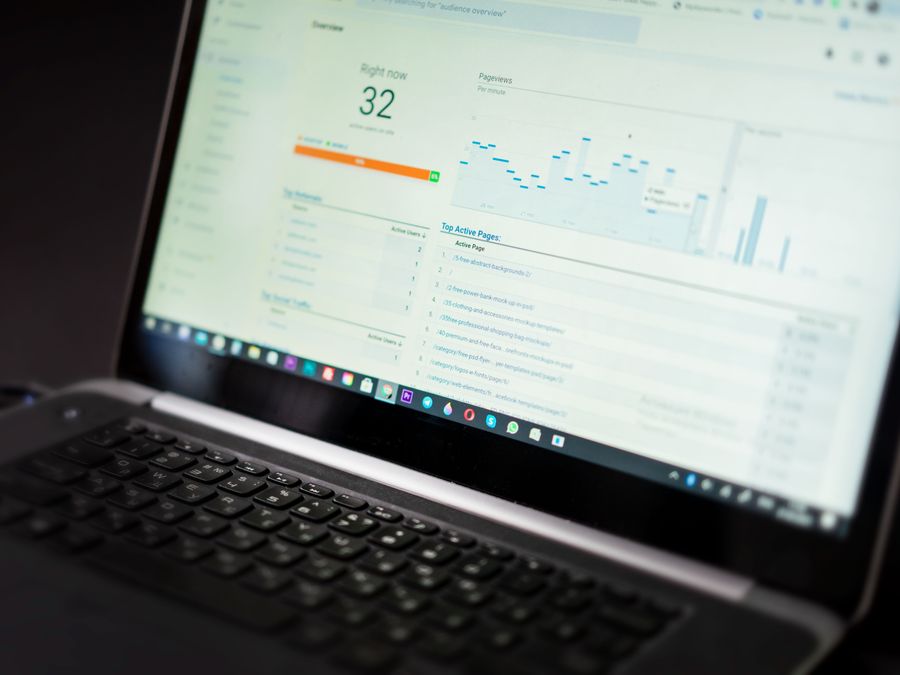
Understanding what works on Instagram requires tracking your performance over time. Automated reports deliver insights to your inbox without requiring manual data collection.
Most scheduling and analytics tools offer automated reporting features. You set up the metrics you want to track, choose your reporting frequency, and receive regular updates. This might be a weekly summary of your top-performing posts or a monthly overview of follower growth and engagement rates.
Automated reports help you spot trends you might miss with occasional manual checks. When you see data consistently over time, patterns emerge. You might notice that certain content types always perform well on specific days, or that your engagement dips during particular periods.
Knowing which Instagram metrics to track is essential for making these reports useful. Focus on metrics that align with your goals. If you’re building awareness, reach and impressions matter most. If you’re driving sales, click-through rates and conversions are more important.
The best automated reports are actionable. They don’t just show you numbers—they highlight what’s working and what needs attention. Look for tools that provide context and recommendations alongside raw data.
Set aside time each week to review your automated reports. Even a quick fifteen-minute review helps you stay informed and make better decisions about your content strategy.
Best Practices to Keep Automation Authentic
Automation is powerful, but it can backfire if it makes your account feel robotic. The goal is to use automation as a support system, not a replacement for genuine human connection.
Always personalize where possible. Even automated messages should feel like they come from a real person. Use conversational language, include the recipient’s name, and avoid overly formal or generic phrasing.
Balance automated content with real-time engagement. Schedule your posts, but also spend time each day responding to comments and messages personally. Your followers can tell the difference between automated responses and genuine interaction.
Be transparent when appropriate. If you use chatbots or automated responses, it’s often better to acknowledge this upfront. People appreciate honesty, and setting expectations prevents frustration.
Regularly review and update your automation. What worked six months ago might feel stale today. Check your automated messages, caption templates, and workflows periodically to ensure they still reflect your current voice and offerings.
Combining automation with data-backed engagement hacks creates a powerful system. You get the efficiency of automation plus the effectiveness of proven engagement techniques.
Finally, remember that automation should serve your audience, not just your convenience. Every automated element should improve the follower experience in some way—faster responses, more consistent content, or better-timed posts. When automation benefits both you and your audience, it becomes a sustainable part of your Instagram strategy.
Instagram automation strategies aren’t about removing the human element from social media. They’re about handling the repetitive tasks so you can focus on what humans do best—creating meaningful content and building real relationships with your community. Start with one or two strategies from this guide, master them, and gradually add more as you see results. Your future self will thank you for the time you’ve saved.
